a non-scary torrenting guide
very quick bit of context and vocabulary
bittorrent is a protocol for peer-to-peer file sharing. in real terms, instead of downloading and uploading files to and from a server, such as google drive, bittorrent allows the files to be shared directly between computers. a bittorrent client allows you to download, create, and manage "torrents", which are files being shared through the protocol. torrents are shared as either a link or a file, each containing the information needed for the bittorrent client to figure out where to connect to and what to download.
doing the actual downloading
to begin, you need a bittorrent client. luckily, there are several. i use qbittorrent and will be referencing its UI (as of v5.2.3) throughout this guide. since this is very basic, you could probably figure out these steps in another client's UI easily, but i make no promises.
once you've followed the installation guide for your chosen client and launched it, locate the torrent link (starts with "magnet:") and click it. you'll probably get pop-up asking you if you want to open this link, and maybe select an application if your client wasn't automatically detected, which you can double check the information on and click "Open Link" (or equivalent) if everything looks correct.

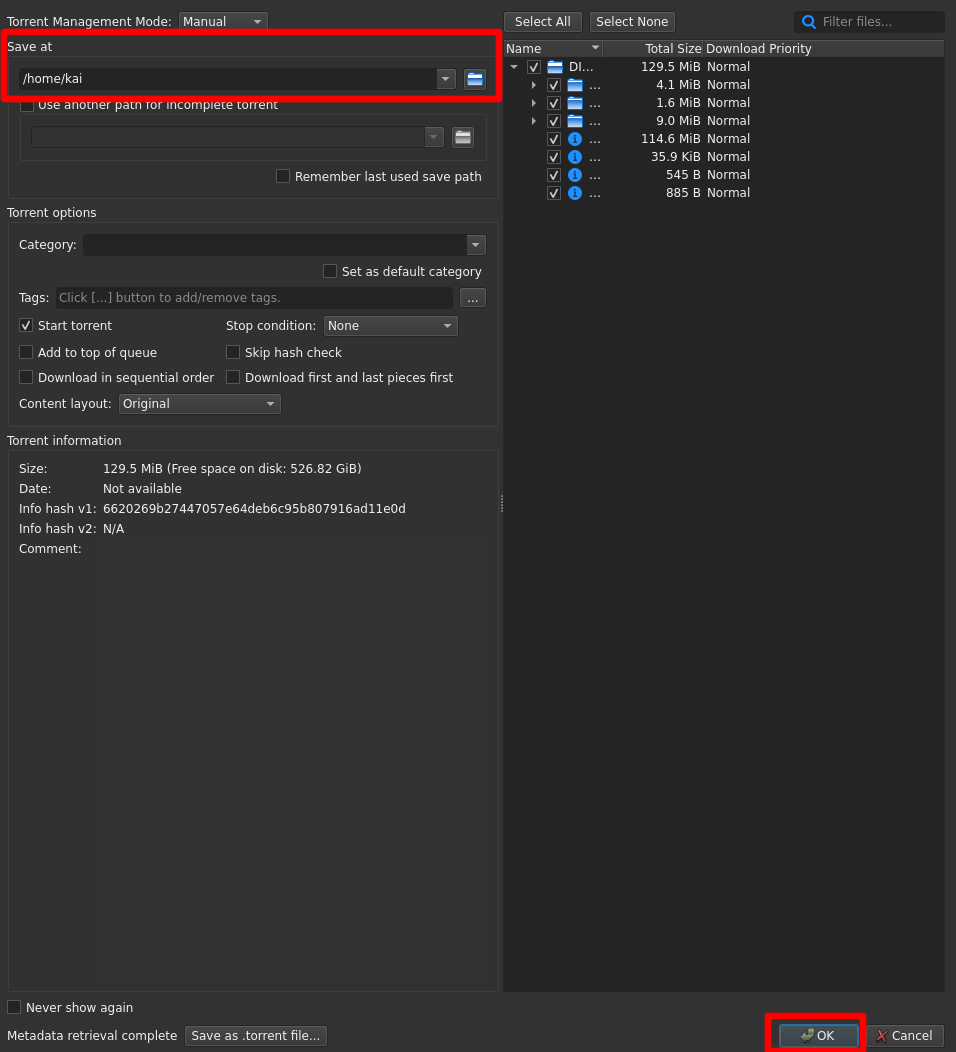
after that, you'll get another pop-up asking you to review the torrent's metadata. the only field you have to care about right now is "Save at" (which i've highlighted in red) so you can choose where you'd like your file(s) to download to. if everything looks correct, click "Ok" (which i also highlighted in red) and the torrent should be added to your transfers list.
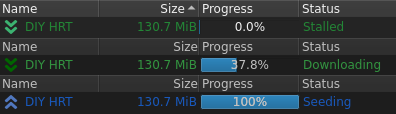
the download will likely be "stalled" at first as your client attempts to find the files, which usually can be fixed by just waiting a bit. if it's stalling for a long time, you can check if it's due to your internet by downloading a popular torrent, such as a linux iso. if that torrent is fine, then the original one may simply not be currently uploading (if it's one of mine, just wait for me to realize the networking is borked and try again later), but otherwise you'll need to debug your internet connection. once a peer is found, you just have to wait for the progress bar to reach 100% and you're done! if you have the resources and are feeling kind, you can leave a copy of the file uploading ("seeding") to help future downloaders.
extra credit
i tried my hardest to make this guide as short and non-technical as i can stand (insert relevant xkcd) so that anyone who has the technical skills to open this website could also follow along, meaning i had to oversimplify and smooth over a lot of fine points. if you want a longer, well-rounded overview on torrenting then you can read protonVPN's guide to torrenting, which is what i originally planned to link to but it seemed too verbose for a total beginner. on the other hand, if you're looking to get really technical then you can check out this bittorrent guide.
that's neat... but why?
bittorrent has a host of uses that i recommend you explore, but are ultimately out of scope for this guide. instead, this section will focus on why i went to all this work when i could've just chucked some proton drive links into an HTML doc and called it a day. there are many practical reasons, such as download speed and pausing, but, for me, it comes down to decentralization. a traditional file server requires the uploader to store their files, which are more than likely unencrypted, on a server, which they more than likely don't own, to be accessed by the downloader. this model is convenient, but it requires utmost faith in the file server's host. what if the server goes down? or the host decides what's "allowed" and censors what isn't? or you simply don't want the host to read all of your shared files?
torrenting reduces these concerns by sharing files directly from machine to machine. servers are sometimes needed to host trackers, though decentralized methods of peer connection like DHT and PEX exist in modern clients, but they don't know the file contents. the only thing peers and trackers will know about you (besides your choice in torrent client) is your IP address (as they have to know where to send/receive the data to/from), but this can be easily masked with a VPN or proxy. if one of the peers goes offline or decides not to share the content anymore for whatever reason then you're not automatically and completely fucked like you would be when downloading from a server. as long as the torrent file or link can be distributed somehow and someone is seeding the file contents then the torrent can prevail despite what large file hosts deem "suitable".
going further, at the core of this is the fact that torrenting allows freedom. your ability to communicate in digital spaces should not come and go at the whims of a government lapdog billion dollar tech company, whether that be file hosts or social media or anything between. you must become independent from proprietary software if you want to break these constraints. share files through bittorrent or another decentralized protocol, write your own website in HTML so that it can be moved between any basic webserver instead of confined to a social media's format, curate your own feeds through RSS instead of scrolling whatever the algorithm thinks will make you stay longer, or anything else that makes your experience your own! make zines!! this could be considered a zine! maybe it isn't a physical booklet, but zines have evolved to encompass more than selling kirk/spock fanzines at a convention. even then, who's to say? a zine can be whatever you want, not whatever a publisher or social media wants.
whether or not you're actually interested in literal zines, normalise sharing scrappy fiddles.